Noticeable Calendar Alert
A character walks onto your screen before every meeting
Overview
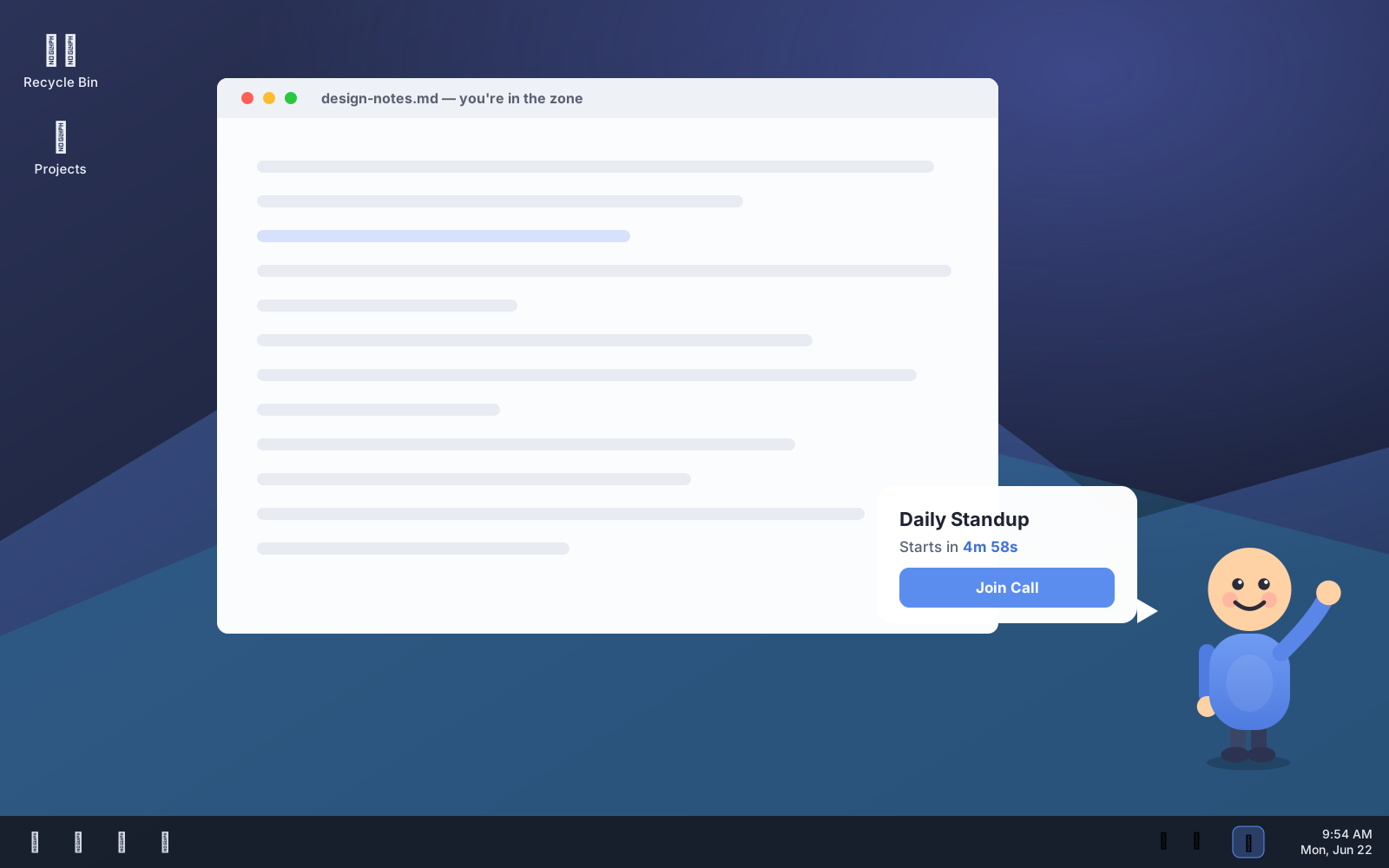
An ultra-lightweight Windows system-tray utility that watches your Google Calendar and, minutes before a meeting starts, summons an always-on-top overlay: a friendly vector character walks in from the right edge of your screen, waves, and pops a speech bubble with the meeting title and a one-click Join Call button. Built with Tauri v2 and vanilla TypeScript — no framework, ~600 KB binary, GPU-only animation.
General Note · The Problem
Quiet calendar pop-ups lose to a focused window every time — you blink and you're five minutes late to the standup with no link in reach. A reminder you can ignore isn't a reminder; you need one that physically interrupts and hands you the Join button.
Built For
Heads-down remote workers and meeting-heavy desk workers who live in full-screen apps, miss the toast notification, and want an impossible-to-ignore nudge plus a one-click way into the call.
Schedule · Key Features
6 ItemsA character that walks in
Instead of a toast you'll miss, a vector character strides in from the right edge, waves, and pops a speech bubble. Motion in your peripheral vision is what actually breaks focus — a pop-up in the corner doesn't.
Always-on-top, focus-stealing
The overlay floats above whatever you're doing — full-screen IDE, slides, browser — so the meeting can't hide behind your work. It's the whole point: be noticeable.
One-click Join Call
The bubble carries the meeting's own link. Click Join and the OS opener fires straight to Meet, Zoom, or Teams — no digging through the invite. Only http(s) links ever reach the opener.
Ultra-light by design
Tauri v2 + vanilla TypeScript, no React, no framework runtime. A ~600 KB native binary using the OS webview, with animation done entirely on the GPU so the CPU stays idle in the tray.
Click-through when idle
The window ignores your cursor entirely except while the bubble is up, so the Join button is clickable but the overlay never gets in your way the rest of the day.
Lives quietly in the tray
Sign in with Google once; tokens go to the OS keychain. It polls the calendar on a slow cadence (never per-second against the API) and only appears when a meeting is near.
Voice · How It Talks
Daily Standup — starts in 4m 58s. [Join Call]
The character has your meeting and your link in hand. No hunting through the invite; the action is right there in the bubble.
Focus block — in 3m 40s.
When there's no join link, the button simply isn't shown — the reminder still lands without a dead button to puzzle over.
Opening Google Meet → meet.google.com/abc-defg-hij
The character waves and walks back off the right edge, click-through is restored, and the overlay disappears until the next meeting.
Comparison · Why It Wins
- Physically interruptive — peripheral motion and an always-on-top overlay beat a corner toast you've trained yourself to ignore
- One-click into the call — the Join button carries the meeting's own link to the OS opener, no digging through the invite
- Tiny footprint — a ~600 KB Tauri binary on the OS webview, not an always-running Electron app eating RAM
- GPU-only animation (transform/opacity) so the tray utility is effectively free on CPU, and it respects prefers-reduced-motion
- Click-through except while the bubble is up — noticeable when it matters, invisible the rest of the day
- Security-minded with untrusted calendar data — meeting titles render as text, never HTML, and only http(s) join links reach the opener